When implementing an Android app that uses GCM topic messaging, I found that there is a risk of DoS attack on it. And seems that Google engineers are aware of it.
A potential attack could render the app not able to receive broadcast messages from servers. The only solution will require developers to release a new version of the app using a new GCM sender ID.
Wednesday, October 7, 2015

Monday, October 5, 2015
Technical details of the Android app Weather Alert Canada
EDIT: Google has since demised GCM and now Environment Canada has its own app to push notification to mobile devices. This app has been unpublished from the Play store.
These are the technical details behind the app.

Getting the data
Meteorological data can be retrieved easily from Environment Canada. The question is, what data to use? My initial thought was to parse the forecast files and extract alert messages from there. However, the forecast data is broken down into many files, each for specific area. And these files are generated frequently. As I planned to host the logic on Google App Engine (more on that later), I would like to minimize the network traffic.Luckily, Environment Canada also provides public weather alerts in CAP format. The CAP files are categorized by issuing offices. Inside the file, the affected area is described by polygons and geocodes that are intended to overlap directly on a map. However, what I needed was to somehow link each affected area to provinces / territories. Good thing is Environment Canada has geo data that can map the area description in CAP to specific provinces.
Push mechanism
A few years ago when I first played with push notification, I tried Amazon SNS. The advantage is that it supports Google Cloud Messaging (GCM), Apple Push Notification (APN) and many more. But it turns out that since Oct 2013, GCM also supports iOS devices. So, to keep it simple this time, the backend utilized GCM to push out notifications.To be specific, GCM Topic is used as the downstream mechanism to broadcast messages. It is much simpler than keeping registration id of each device and sending out targeted GCM messages. The downside is, users cannot request to receive notification on certain areas only (well, technically it can be done with topic subscription too, but that means I need to create lots of GCM topics for different areas...)
Backend logic
Before implementing the server side with App Engine, a quick prototype was created using Python. urllib2 is used to fetch CAP files from Environment Canada site. After processing the xml file, GCM messages are pushed out with urllib2 in JSON format.
A script was also created to load mapping between areas and provinces into a database. DBM was used as the API is simple and made it easy to port to Google Datastore.
Another DBM file was also used to keep track of processed CAP files.
Once the prototype is working, porting it to App Engine was easy. Cron jobs were defined to pull CAP data periodically. There are also cron jobs to clean datastore of processed files.
A script was also created to load mapping between areas and provinces into a database. DBM was used as the API is simple and made it easy to port to Google Datastore.
Another DBM file was also used to keep track of processed CAP files.
Once the prototype is working, porting it to App Engine was easy. Cron jobs were defined to pull CAP data periodically. There are also cron jobs to clean datastore of processed files.
Datastore and memcached
When moving the Python scripts to Google App Engine, the DBM databases were ported to Datastore. As I intended to use the App Engine free tier, there was a need to keep the I/O low. Luckily App Engine provides memcache as a free service. With proper caching (over 98% hit rate), I could keep the datastore utilization as low as 2% of the daily quota.
Android app
The android app was a shameless clone of the GCM sample application. On the navigator bar, users can choose to show notifications for specific provinces only. The main window is a WebView. A HTML file and some JavaScript are included in the app to fetch Environment Canada WeatherLink.
Tuesday, September 29, 2015
Do you feel lucky today? (aka random Android notification ID)
Recently created an Android app that receives Google Cloud Messaging (GCM) messages. Upon receiving certain messages, notifications will be shown on devices. Due to nature of the data, it is expected that a device will receive short bursts of multiple messages from time to time.
Now, to show a notification on Android, we need to assign an ID that is unique within the app. The "right way" to do it is to keep a counter as ID for each notification.
Well, I am too lazy to store that ID in the app. I have seen on stacktrace that some people tried to use the current timestamp in millisecond (long int) as ID. But since the ID is an int, they divide the long by 1000 (ie reduce the resolution to second instead of millisecond) and cast the number to int. That is going to fail in my case as my app will receive multiple messages within a second.
There is an easy (and risky?) way to generate a "random" ID on the fly without keeping track of it: get system nano second in long and hash it.
Long.valueOf(System.nanoTime()).hashCode()
The (potential) downside is:
- nanoTime in signed long will repeat every 292 years (roughly). But that is ok for my app
- hashing long into int may result in collision, but the chance should be small if I only need a few numbers in each burst of incoming notifications
So, do I feel lucky today?
Saturday, September 19, 2015
Integral Perfect Square
Here is a C implementation of calculating integral square root. Algorithm based on "long division" logic. Test cases done with OpenMP and should be compiled as
Reference:
http://www.math-only-math.com/square-root-of-a-perfect-square-by-using-the-long-division-method.html
Gihub:
https://github.com/kitsook/CPerfectSquare
g++ --std=c++0x -fopenmp -Wall IntegralPerfectSquare.cpp -o IntegralPerfectSquare
Reference:
http://www.math-only-math.com/square-root-of-a-perfect-square-by-using-the-long-division-method.html
Gihub:
https://github.com/kitsook/CPerfectSquare
Wednesday, September 9, 2015
Project Euler: Integral median
From Project Euler:
ABC is an integral sided triangle with sides a≤b≤c.
mc is the median connecting C and the midpoint of AB.
F(n) is the number of such triangles with c≤n for which mc has integral length as well.
F(10)=3 and F(50)=165.
Find F(100000).
Let d be the median. Then d can be calculated by (1):
A brute-force solution is to loop through the range of a, b, and c. There are some conditions / optimization to reduce the scope and improve performance:
Tried to implement it with Scala. The code is concise and under 30 lines (with comments!). However, running it on my i5 4120 will probably take weeks to complete. And that is with parallelism and all CPU cores at 100%.
Time to re-install OpenCL SDK and do some coding in C/C++.
ABC is an integral sided triangle with sides a≤b≤c.
mc is the median connecting C and the midpoint of AB.
F(n) is the number of such triangles with c≤n for which mc has integral length as well.
F(10)=3 and F(50)=165.
Find F(100000).
Let d be the median. Then d can be calculated by (1):
d = sqrt(2 * a^2 + 2 * b^2 - c^2) / 2
A brute-force solution is to loop through the range of a, b, and c. There are some conditions / optimization to reduce the scope and improve performance:
- a, b, c can form a proper triangle (triangle inequality. i.e. sum of any two sides is bigger than the remaining side)
a+b>c && b+c>a && c+a>b
- since a<=b<=c, the checking above can be rewritten as
a+b>c
- c must be even (otherwise, the square root result will be odd and d wont be an integer)
- if c is even, a and b must have the same parity. Because (1) can be rewritten as:
2(d^2 + (c/2)^2) = a^2 + b^2
- pre-calculate even perfect sqaures instead of doing square root and check if dividable by 2
Tried to implement it with Scala. The code is concise and under 30 lines (with comments!). However, running it on my i5 4120 will probably take weeks to complete. And that is with parallelism and all CPU cores at 100%.
Time to re-install OpenCL SDK and do some coding in C/C++.
Wednesday, September 2, 2015
Android Safe is no more... Long live AndSafe
Back in 2009, I got my first Android phone - the HTC Magic which ran Android 1.5. There were only handful of apps available on Android Market (now Google Play). I wanted something to replace my Palm Pilot MemoAES but couldn't find something that was simple to use and secure (e.g. no network permission). So I decided to write my own and later I released the Android Safe as freeware.


Fast forward to 2014. In Sep I received an email from Google saying that "The use of 'Android' in your title is not compliant with Android branding guidelines" and they would suspend my app unless I rename my app.
To be honest, I developed the app for my own use. I put it on Android Market / Google Play just to share it in case someone out there wanted similar things. I wasn't making any money out of it. So I didn't do anything and eventually Google removed my app from Market.
In 2015, I finally got some time to sit down to see how I can improve Android Safe:
- it used 256-bit AES with ECB mode. I picked ECB because I was lazy to implement a secure way to generate the IV. Also, most of my memos are short (e.g. password, PIN etc) and without pattern. So ECB was fine. But if I am going to re-do it again, maybe I will use CBC instead
- 1024-round of PBKDF2 was used to generate the encryption key. It was OK back then, but now I prefer to use something that is more CPU intensive and can stand against ASIC attacks. After comparing bcrypt and scrypt, I decided to go with scrypt. Theoretically scrypt is better than bcrypt, but scrypt is newer and this is usually a bad thing in cryptography as there are not enough cryptoanalysis done against it. But anyway, I am using it as a key generator rather than cipher, so it is good enough for me.
- JNI library was used to accelerate the PBKDF2 key generation. Back then, the Android NDK only supported ARM platform. Now the app should compile for x86 and MIPS too
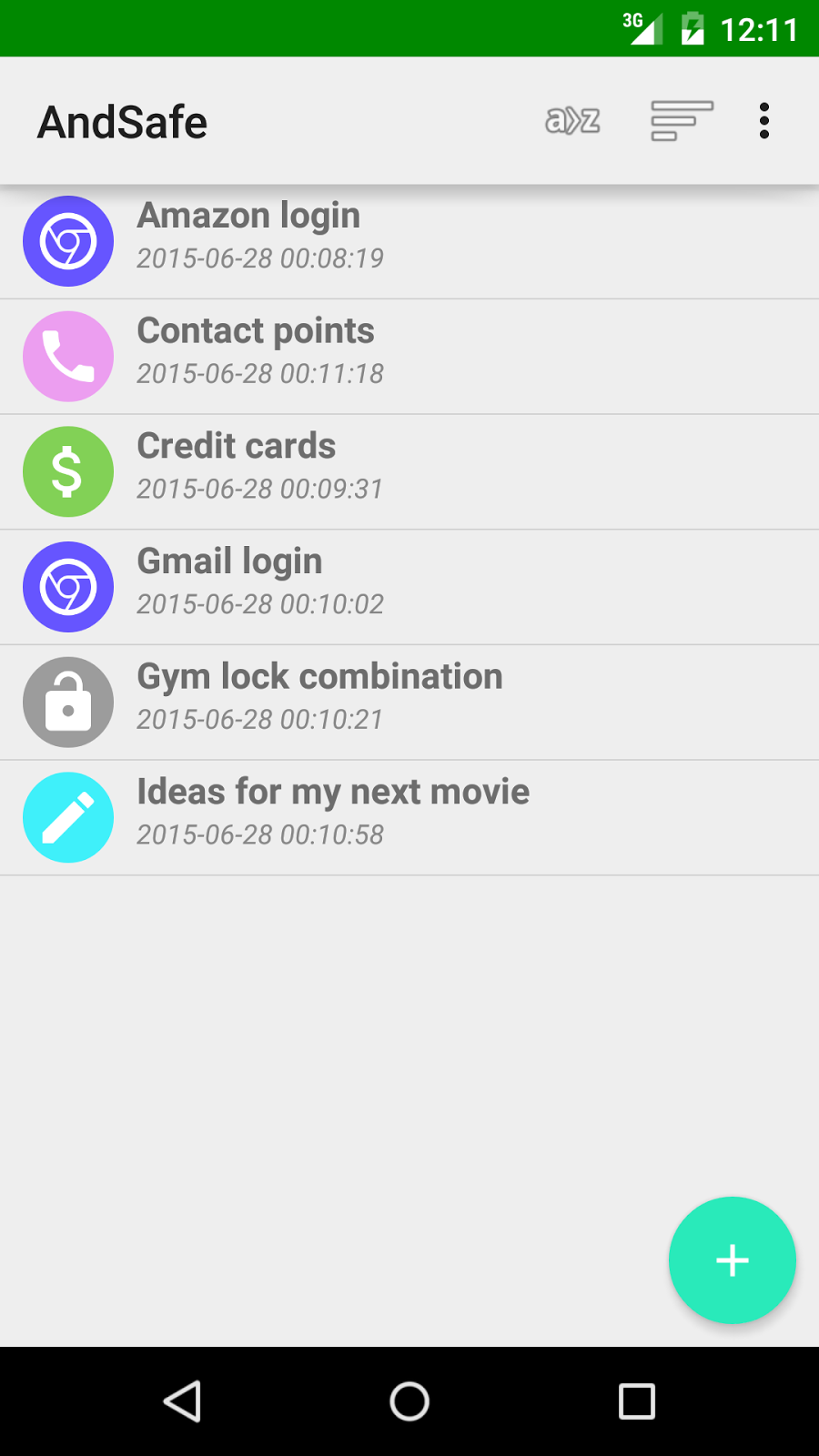
And so, AndSafe was born. Besides changes on the encryption logic, the UI was redo to remove the outdated Gallery UI component.

Sunday, August 23, 2015
Apache Spark Standalone cluster on UDOO and Raspberry Pi
After setting up Apache Spark on UDOO, I tried to setup a cluster by adding a Raspberry Pi. Here are the steps.
Environment
In this setup, UDOO will be both a master and a worker. Another worker will be on a Raspberry Pi. A user account "spark" is created on both machines. Each machine has Apache Spark placed under its home directory (e.g. /home/spark/spark-1.4.1-bin-hadoop2.6).
For reference, my UDOO is running Arch Linux (kernel 4.1.6) with Oracle JDK 1.8.0_60, Scala, 2.10.5, and Python 2.7.10. Hostname is "maggie".
The Raspberry Pi (512MB Model B) is running Raspbian (kernel 4.1.6) with Oracle JDK 1.8.0, Scala 2.10.5, and Python 2.7.3. Hostname is "spark01". (Note that you may want to modify the line in /etc/hosts that points 127.0.0.1 to the hostname. Change it to point to the IP address of eth0 instead. Otherwise Spark may bind to the wrong address)
Setup
First we need to enable auto-login of ssh with key-pair as Spark master will need to login to slaves. On UDOO (the master), login as spark and execute the following command to generate keys
Use empty password (just press Enter) when prompted to encrypt the private key. Then we need to copy the public key as "authorized_keys" on both UDOO (as UDOO will run as one of the slaves) and Raspberry Pi
Enter password when copying the key to spark01 (the Raspberry Pi). Once it is done, try to ssh to spark01 again and no password should be needed to login.
Once ssh is configured, we can setup Spark itself.
Under the conf folder of Spark, create a file called slave to list our Spark worker machines
Note that the second line is "localhost", which will start a worker locally on UDOO.
Also on the master machine, copy conf/spark-env.sh.template as conf/spark-env.sh and uncomment / edit the followings.
SPARK_MASTER_IP points to the address of my UDOO. The number of worker cores is set as 2 since we will be running the master on UDOO too so better not let it uses all 4 cores by default. Worker memory set as 256MB. For other options, refer the Spark site.
Create the same conf/spark-env.sh on Raspberry Pi. For my Raspberry Pi B with only 1 core, I changed SPARK_WORKER_CORES to 1. If you have multiple slaves to deploy to, you may use scp to copy them (and test out the no-password-login of ssh at the same time):
The cluster should be ready by now. We can start the master and slaves by running commands on the master
You can also start master and individual slaves separately. Refer to the Spark document for other commands.
Check the console and logs folder for any error messages. Strangely, on my setup, the console has error messages but in fact both master and slaves are ok.
To make sure everything is working, point your browser to the cluster web UI on the master node, e.g. http://192.168.1.10:8080/
You should see two workers connected to the cluster. (Wait for a minute or two, it takes some time for the worker on Raspberry Pi to startup).

We can then submit a job to the cluster, e.g.
(Note the use of --executor-memory. Since I configured my slaves with worker memory of 256MB only, I need to limit the application memory when submitting job too. Otherwise, there will be no appropriate worker to pick up the jobs)
Refresh the web UI to monitor the progress.
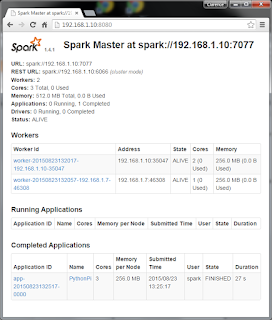
On my setup, the UDOO workers usually pick up application much quicker than Raspberry Pi, so with simple test like this, no job will be run on Raspberry Pi at all. Remove UDOO from the conf/slaves list to test only the Raspbery Pi if necessary.
Environment
In this setup, UDOO will be both a master and a worker. Another worker will be on a Raspberry Pi. A user account "spark" is created on both machines. Each machine has Apache Spark placed under its home directory (e.g. /home/spark/spark-1.4.1-bin-hadoop2.6).
For reference, my UDOO is running Arch Linux (kernel 4.1.6) with Oracle JDK 1.8.0_60, Scala, 2.10.5, and Python 2.7.10. Hostname is "maggie".
The Raspberry Pi (512MB Model B) is running Raspbian (kernel 4.1.6) with Oracle JDK 1.8.0, Scala 2.10.5, and Python 2.7.3. Hostname is "spark01". (Note that you may want to modify the line in /etc/hosts that points 127.0.0.1 to the hostname. Change it to point to the IP address of eth0 instead. Otherwise Spark may bind to the wrong address)
Setup
First we need to enable auto-login of ssh with key-pair as Spark master will need to login to slaves. On UDOO (the master), login as spark and execute the following command to generate keys
$ ssh-keygen -t rsa -b 4096
Use empty password (just press Enter) when prompted to encrypt the private key. Then we need to copy the public key as "authorized_keys" on both UDOO (as UDOO will run as one of the slaves) and Raspberry Pi
$ cp ~/.ssh/id_rsa.pub ~/.ssh/authorized_keys
$ chmod go-r-w-x ~/.ssh/authorized_keys
$ ssh-copy-id spark@spark01
Enter password when copying the key to spark01 (the Raspberry Pi). Once it is done, try to ssh to spark01 again and no password should be needed to login.
Once ssh is configured, we can setup Spark itself.
Under the conf folder of Spark, create a file called slave to list our Spark worker machines
spark01
localhost
Note that the second line is "localhost", which will start a worker locally on UDOO.
Also on the master machine, copy conf/spark-env.sh.template as conf/spark-env.sh and uncomment / edit the followings.
SPARK_MASTER_IP=192.168.1.10
SPARK_WORKER_CORES=2
SPARK_WORKER_MEMORY=256m
SPARK_EXECUTOR_MEMORY=256m
SPARK_DRIVER_MEMORY=256m
SPARK_MASTER_IP points to the address of my UDOO. The number of worker cores is set as 2 since we will be running the master on UDOO too so better not let it uses all 4 cores by default. Worker memory set as 256MB. For other options, refer the Spark site.
Create the same conf/spark-env.sh on Raspberry Pi. For my Raspberry Pi B with only 1 core, I changed SPARK_WORKER_CORES to 1. If you have multiple slaves to deploy to, you may use scp to copy them (and test out the no-password-login of ssh at the same time):
$ scp ~/spark-1.4.1-bin-hadoop2.6/conf/spark-env.sh spark@spark01:spark-1.4.1-bin-hadoop2.6/conf/
$ scp ~/spark-1.4.1-bin-hadoop2.6/conf/spark-env.sh spark@spark02:spark-1.4.1-bin-hadoop2.6/conf/
$ scp ~/spark-1.4.1-bin-hadoop2.6/conf/spark-env.sh spark@spark03:spark-1.4.1-bin-hadoop2.6/conf/
...
The cluster should be ready by now. We can start the master and slaves by running commands on the master
$ sbin/start-all.sh
You can also start master and individual slaves separately. Refer to the Spark document for other commands.
Check the console and logs folder for any error messages. Strangely, on my setup, the console has error messages but in fact both master and slaves are ok.
......
failed to launch org.apache.spark.deploy.master.Master
full log in /home/spark/spark-1.4.1-bin-hadoop2.6/sbin/../logs/spark-spark-org.apache.spark.deploy.master.Master-1-maggie.out
......
spark01: failed to launch org.apache.spark.deploy.worker.Worker:
spark01: full log in /home/spark/spark-1.4.1-bin-hadoop2.6/sbin/../logs/spark-spark-org.apache.spark.deploy.worker.Worker-1-spark01.out
......
To make sure everything is working, point your browser to the cluster web UI on the master node, e.g. http://192.168.1.10:8080/
You should see two workers connected to the cluster. (Wait for a minute or two, it takes some time for the worker on Raspberry Pi to startup).

We can then submit a job to the cluster, e.g.
$ bin/spark-submit --master spark://192.168.1.10:7077 --executor-memory=256m examples/src/main/python/pi.py 10
(Note the use of --executor-memory. Since I configured my slaves with worker memory of 256MB only, I need to limit the application memory when submitting job too. Otherwise, there will be no appropriate worker to pick up the jobs)
Refresh the web UI to monitor the progress.

On my setup, the UDOO workers usually pick up application much quicker than Raspberry Pi, so with simple test like this, no job will be run on Raspberry Pi at all. Remove UDOO from the conf/slaves list to test only the Raspbery Pi if necessary.
Thursday, August 20, 2015
Comparing JVM options when tuning for performance
Sometimes, when tuning the JVM performance by trying different command line options, it is useful to see what flags are actually effective.
We could specify the option "-XX:+UnlockDiagnosticVMOptions -XX:+PrintFlagsFinal" to do just that.
The followings are the diff (diff -U 0) between -server and -client options, running on Java 1.8.0_60 on ARM hf.
We could specify the option "-XX:+UnlockDiagnosticVMOptions -XX:+PrintFlagsFinal" to do just that.
The followings are the diff (diff -U 0) between -server and -client options, running on Java 1.8.0_60 on ARM hf.
$java -server -XX:+UnlockDiagnosticVMOptions -XX:+PrintFlagsFinal > server
$java -client -XX:+UnlockDiagnosticVMOptions -XX:+PrintFlagsFinal > client
$ diff -U 0 client server
--- client 2015-08-20 18:25:36.208946610 -0700
+++ server 2015-08-20 18:25:24.664324031 -0700
@@ -12,0 +13,2 @@
+ intx AliasLevel = 3 {C2 product}
+ bool AlignVector = true {C2 product}
@@ -30,0 +33 @@
+ intx AutoBoxCacheMax = 128 {C2 product}
@@ -33 +36 @@
- intx BackEdgeThreshold = 100000 {pd product}
+ intx BackEdgeThreshold = 140000 {pd product}
@@ -41,0 +45,3 @@
+ bool BlockLayoutByFrequency = true {C2 product}
+ intx BlockLayoutMinDiamondPercentage = 20 {C2 product}
+ bool BlockLayoutRotateLoops = true {C2 product}
@@ -42,0 +49 @@
+ bool BranchOnRegister = false {C2 product}
@@ -45,9 +52 @@
- bool C1OptimizeVirtualCallProfiling = true {C1 product}
- bool C1PatchInvokeDynamic = true {C1 diagnostic}
- bool C1ProfileBranches = true {C1 product}
- bool C1ProfileCalls = true {C1 product}
- bool C1ProfileCheckcasts = true {C1 product}
- bool C1ProfileInlinedCalls = true {C1 product}
- bool C1ProfileVirtualCalls = true {C1 product}
- bool C1UpdateMethodData = false {C1 product}
- intx CICompilerCount = 1 {product}
+ intx CICompilerCount = 2 {product}
@@ -148 +147 @@
- intx CompileThreshold = 1500 {pd product}
+ intx CompileThreshold = 10000 {pd product}
@@ -153,0 +153 @@
+ intx ConditionalMoveLimit = 4 {C2 pd product}
@@ -161,0 +162 @@
+ bool DebugInlinedCalls = true {C2 diagnostic}
@@ -171,0 +173 @@
+ccstrlist DisableIntrinsic = {C2 diagnostic}
@@ -174,0 +177,2 @@
+ bool DoEscapeAnalysis = true {C2 product}
+ intx DominatorSearchLimit = 1000 {C2 diagnostic}
@@ -180,0 +185,5 @@
+ intx EliminateAllocationArraySizeLimit = 64 {C2 product}
+ bool EliminateAllocations = true {C2 product}
+ bool EliminateAutoBox = true {C2 product}
+ bool EliminateLocks = true {C2 product}
+ bool EliminateNestedLocks = true {C2 product}
@@ -188,0 +198 @@
+ double EscapeAnalysisTimeout = 20.000000 {C2 product}
@@ -210 +220 @@
- intx FreqInlineSize = 325 {pd product}
+ intx FreqInlineSize = 175 {pd product}
@@ -265,0 +276 @@
+ bool IncrementalInline = true {C2 product}
@@ -267 +278 @@
- uintx InitialCodeCacheSize = 163840 {pd product}
+ uintx InitialCodeCacheSize = 1572864 {pd product}
@@ -276 +287,2 @@
- bool InlineSynchronizedMethods = true {C1 product}
+ bool InsertMemBarAfterArraycopy = true {C2 product}
+ intx InteriorEntryAlignment = 16 {C2 pd product}
@@ -290 +301,0 @@
- bool LIRFillDelaySlots = false {C1 pd product}
@@ -293,0 +305 @@
+ intx LiveNodeCountInliningCutoff = 40000 {C2 product}
@@ -300,0 +313,6 @@
+ bool LoopLimitCheck = true {C2 diagnostic}
+ intx LoopMaxUnroll = 16 {C2 product}
+ intx LoopOptsCount = 43 {C2 product}
+ intx LoopUnrollLimit = 60 {C2 pd product}
+ intx LoopUnrollMin = 4 {C2 product}
+ bool LoopUnswitching = true {C2 product}
@@ -320,0 +339,4 @@
+ intx MaxJumpTableSize = 65000 {C2 product}
+ intx MaxJumpTableSparseness = 5 {C2 product}
+ intx MaxLabelRootDepth = 1100 {C2 product}
+ intx MaxLoopPad = 15 {C2 product}
@@ -325 +347,2 @@
- uint64_t MaxRAM = 1073741824 {pd product}
+ intx MaxNodeLimit = 75000 {C2 product}
+ uint64_t MaxRAM = 0 {pd product}
@@ -330 +353,2 @@
- uintx MetaspaceSize = 12582912 {pd product}
+ intx MaxVectorSize = 8 {C2 product}
+ uintx MetaspaceSize = 16777216 {pd product}
@@ -334,0 +359 @@
+ intx MinJumpTableSize = 16 {C2 pd product}
@@ -341,0 +367 @@
+ intx MultiArrayExpandLimit = 6 {C2 product}
@@ -350 +376 @@
- bool NeverActAsServerClassMachine = true {pd product}
+ bool NeverActAsServerClassMachine = false {pd product}
@@ -357,0 +384 @@
+ intx NodeLimitFudgeFactor = 2000 {C2 product}
@@ -358,0 +386 @@
+ intx NumberOfLoopInstrToAlign = 4 {C2 product}
@@ -365 +393,6 @@
- intx OnStackReplacePercentage = 933 {pd product}
+ intx OnStackReplacePercentage = 140 {pd product}
+ bool OptimizeExpensiveOps = true {C2 diagnostic}
+ bool OptimizeFill = true {C2 product}
+ bool OptimizePtrCompare = true {C2 product}
+ bool OptimizeStringConcat = true {C2 product}
+ bool OptoBundling = false {C2 pd product}
@@ -366,0 +400 @@
+ bool OptoScheduling = true {C2 pd product}
@@ -382,0 +417,3 @@
+ bool PartialPeelAtUnsignedTests = true {C2 product}
+ bool PartialPeelLoop = true {C2 product}
+ intx PartialPeelNewPhiDelta = 0 {C2 product}
@@ -442,0 +480 @@
+ bool PrintIntrinsics = false {C2 diagnostic}
@@ -453,0 +492,2 @@
+ bool PrintPreciseBiasedLockingStatistics = false {C2 diagnostic}
+ bool PrintPreciseRTMLockingStatistics = false {C2 diagnostic}
@@ -473 +513,2 @@
- bool ProfileInterpreter = false {pd product}
+ bool ProfileDynamicTypes = true {C2 diagnostic}
+ bool ProfileInterpreter = true {pd product}
@@ -482,0 +524,5 @@
+ bool RangeLimitCheck = true {C2 diagnostic}
+ bool ReassociateInvariants = true {C2 product}
+ bool ReduceBulkZeroing = true {C2 product}
+ bool ReduceFieldZeroing = true {C2 product}
+ bool ReduceInitialCardMarks = true {C2 product}
@@ -496,3 +542,2 @@
- bool RewriteBytecodes = false {pd product}
- bool RewriteFrequentPairs = false {pd product}
- intx SafepointPollOffset = 0 {C1 pd product}
+ bool RewriteBytecodes = true {pd product}
+ bool RewriteFrequentPairs = true {pd product}
@@ -515,0 +561,2 @@
+ bool SpecialEncodeISOArray = true {C2 product}
+ bool SplitIfBlocks = true {C2 product}
@@ -578 +624,0 @@
- bool TimeLinearScan = false {C1 product}
@@ -599,0 +646,2 @@
+ bool TraceTypeProfile = false {C2 diagnostic}
+ intx TrackedInitializationLimit = 50 {C2 product}
@@ -601,0 +650 @@
+ bool TrapBasedRangeChecks = false {C2 pd product}
@@ -603,0 +653 @@
+ intx TypeProfileMajorReceiverPercent = 90 {C2 product}
@@ -608,0 +659 @@
+ bool UnrollLimitCheck = true {C2 diagnostic}
@@ -622,0 +674 @@
+ bool UseBimorphicInlining = true {C2 product}
@@ -632,0 +685 @@
+ bool UseCondCardMark = false {C2 product}
@@ -633,0 +687 @@
+ bool UseDivMod = true {C2 product}
@@ -634,0 +689 @@
+ bool UseFPUForSpilling = true {C2 product}
@@ -643,0 +699 @@
+ bool UseImplicitStableValues = true {C2 diagnostic}
@@ -644,0 +701 @@
+ bool UseInlineDepthForSpeculativeTypes = true {C2 diagnostic}
@@ -645,0 +703 @@
+ bool UseJumpTables = true {C2 product}
@@ -653 +711,2 @@
- bool UseLoopInvariantCodeMotion = true {C1 product}
+ bool UseLoopPredicate = true {C2 product}
+ bool UseMathExactIntrinsics = true {C2 product}
@@ -655,0 +715 @@
+ bool UseMultiplyToLenIntrinsic = false {C2 product}
@@ -661,0 +722 @@
+ bool UseOldInlining = true {C2 product}
@@ -662,0 +724 @@
+ bool UseOnlyInlinedBimorphic = true {C2 product}
@@ -663,0 +726 @@
+ bool UseOptoBiasInlining = false {C2 product}
@@ -669 +732,2 @@
- bool UsePopCountInstruction = false {product}
+ bool UsePopCountInstruction = true {product}
+ bool UseRDPCForConstantTableBase = false {C2 product}
@@ -680,0 +745 @@
+ bool UseSuperWord = true {C2 product}
@@ -684,0 +750 @@
+ bool UseTypeSpeculation = true {C2 product}
@@ -690,2 +756 @@
- intx ValueMapInitialSize = 11 {C1 product}
- intx ValueMapMaxLoopSize = 8 {C1 product}
+ intx ValueSearchLimit = 1000 {C2 product}
Wednesday, August 19, 2015
Testing I2C connections between Raspberry Pi and Arduino
Can a 5V Arduino connect directly to a 3.3V Raspberry Pi via I2C? Yes. Sort of. You will need to disable the Arduino internal pullup resistors. The internal pullup resistors of Raspberry Pi, in theory, should make the connection works without using a level shifter.
Code also available on github
Rpi          Arduino
---------    ---------
Gnd          Gnd
SDA (GPIO0)  SDA (A4)
SCL (GPIO1)  SCL (A5)
Code also available on github
Saturday, August 15, 2015
Subscribe to:
Posts (Atom)